As ferramentas que faltam no OBS, num plugin só e grátis.
The tools OBS is missing, in one free plugin.
Abas de layout, chat unificado de Twitch, YouTube e Kick com os eventos da live, overlays (alertas, chat na tela, metas, enquete, subathon), multistream, canvas vertical e efeitos de áudio e vídeo. Para Windows, Linux e macOS, código aberto (GPL-2.0).
Layout tabs, a unified Twitch, YouTube and Kick chat with the stream events, overlays (alerts, chat on screen, goals, poll, subathon), multistream, a vertical canvas and audio/video effects. For Windows, Linux and macOS, open source (GPL-2.0).
BaixarDownload GitHubFerramentas
Tools
Abas de layout
Layout tabs
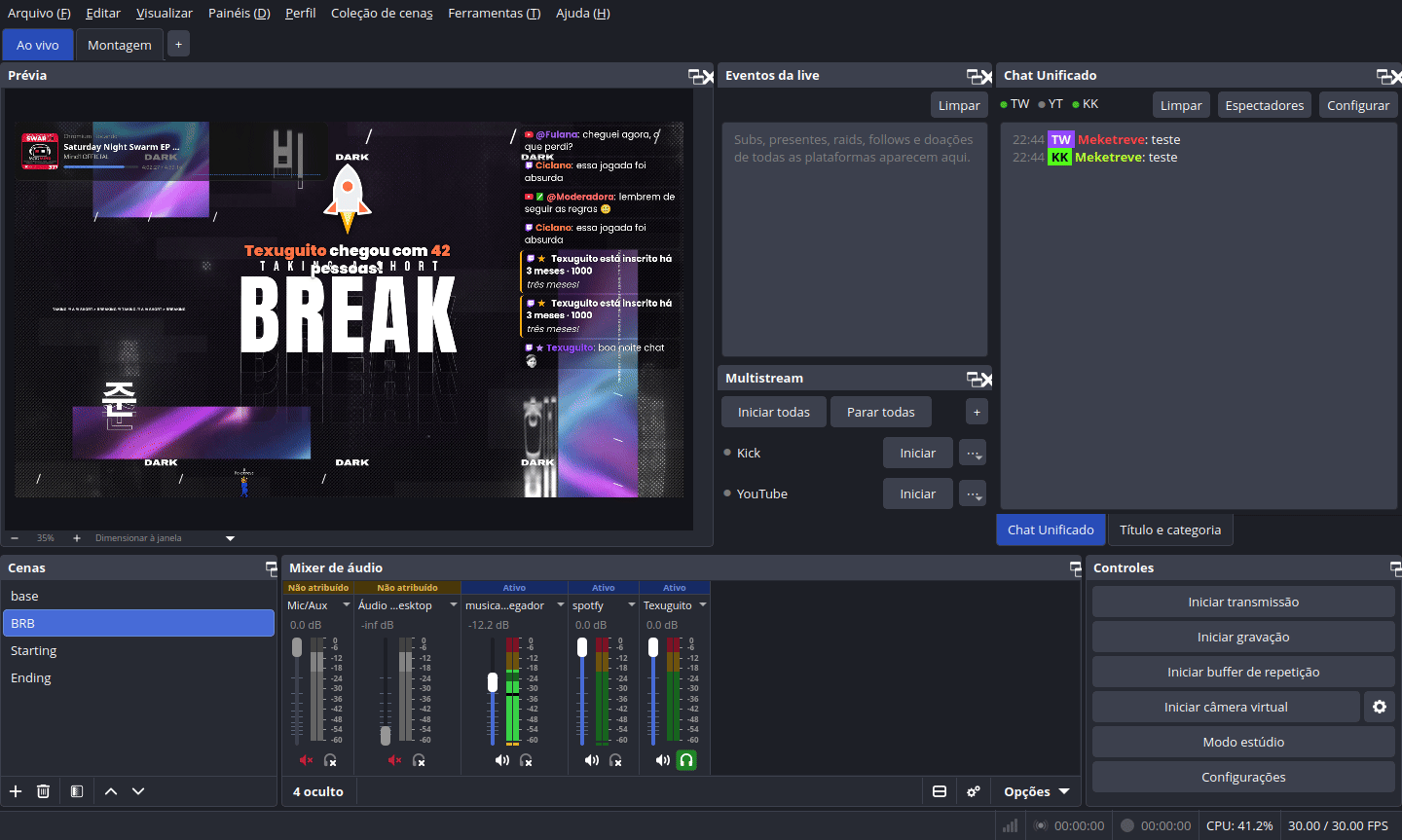
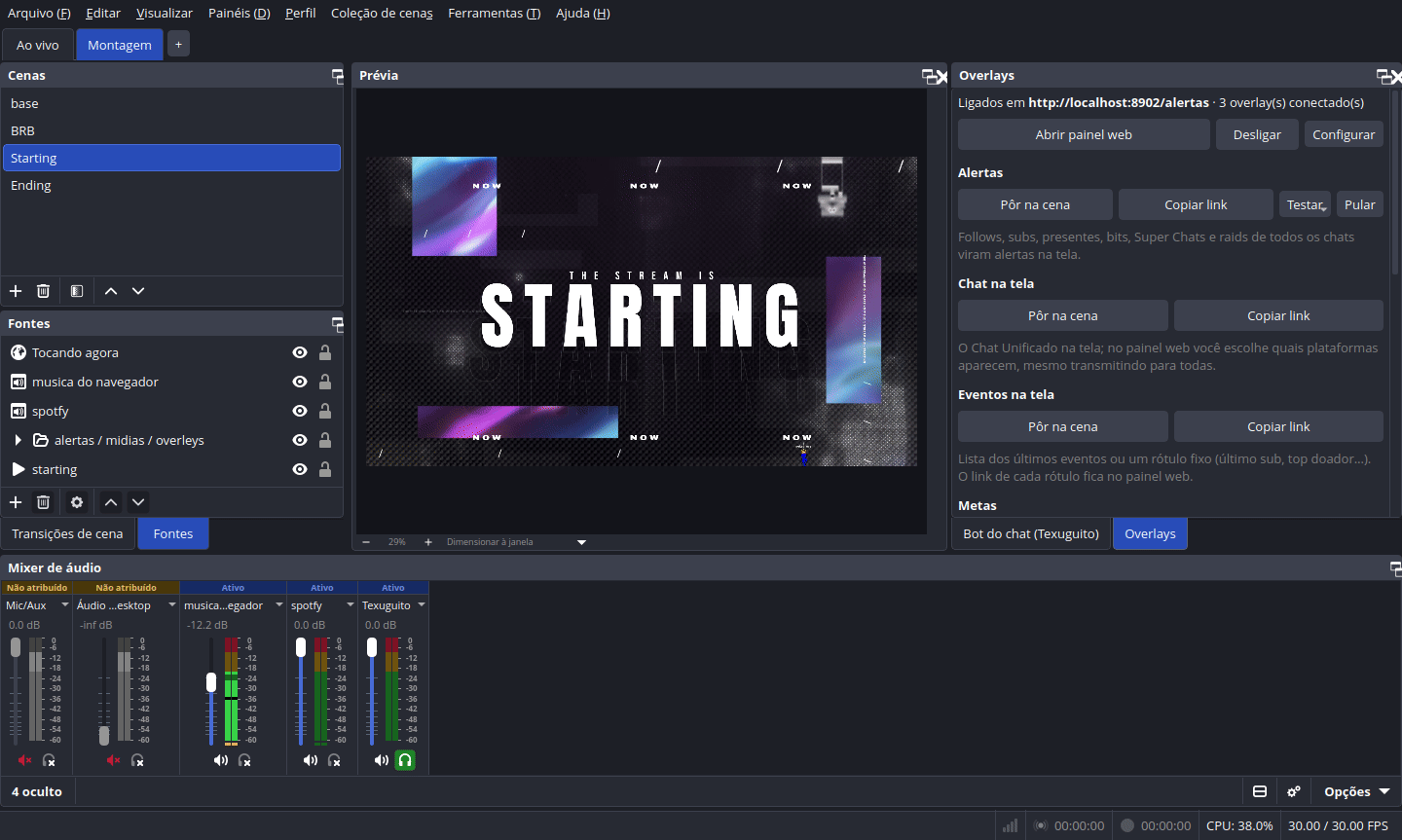
Uma barra embaixo do menu troca o layout inteiro dos painéis: Ao vivo, Montagem e as suas. Salva sozinho, por perfil.
A bar under the menu swaps the whole dock layout: Live, Build and your own. Saves on its own, per profile.
Chat unificado
Unified chat
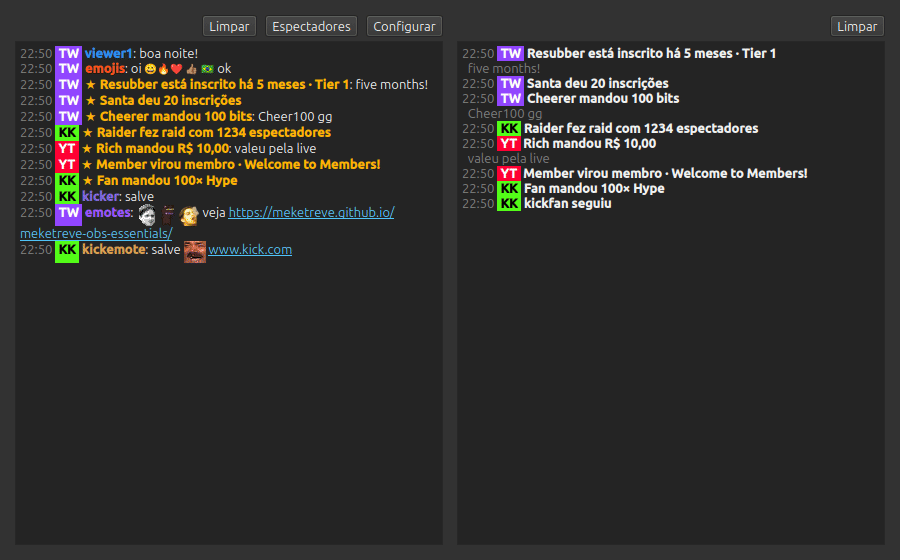
Twitch, YouTube e Kick num painel só. Com login na Twitch e no Kick: enviar mensagens, silenciar, banir e apagar.
Twitch, YouTube and Kick in one dock. Log in to Twitch and Kick to send messages, time out, ban and delete.
Eventos da live
Stream events
Subs, presentes, raids, bits, follows, Super Chats e presentes do Kick de todas as plataformas numa lista.
Subs, gifts, raids, bits, follows, Super Chats and Kick gifts from every platform in one list.
Multistream
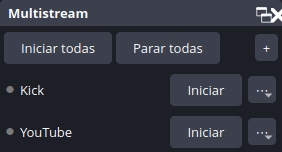
Transmita para várias plataformas ao mesmo tempo, reaproveitando o codificador da transmissão principal ou com um próprio. No YouTube a live começa sem abrir o Studio.
Stream to several platforms at once, reusing the main stream's encoder or with one of its own. On YouTube the live starts without opening the Studio.
Canvas vertical
Vertical canvas
Um segundo canvas 9:16 com cenas, fontes, gravação e transmissão próprias (baseado no Aitum Vertical).
A second 9:16 canvas with its own scenes, sources, recording and streaming (based on Aitum Vertical).
Compartilhar configuração
Share configuration
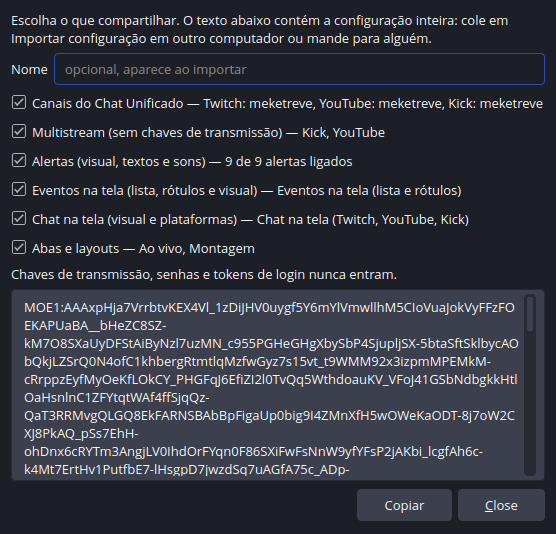
Exporte abas, canais e saídas como um texto MOE1: e importe em outro PC. Chaves nunca vão junto.
Export tabs, channels and outputs as one MOE1: text and import it on another PC. Keys never go along.
Bot do chat (Texuguito)
Chat bot (Texuguito)
Bot do chat com desfile pixel art de quem assiste, pontos, missões com XP e nível, aventuras, chefão coletivo, itens exclusivos e loja, áudios, TTS, sorteio, comandos criados pelo chat e mensagens automáticas por tempo, para todas as plataformas.
Chat bot with a pixel-art parade of your viewers, points, quests with XP and levels, adventures, a boss the whole chat fights, exclusive items and a shop, sound clips, TTS, raffles, chat-made commands and automatic messages on a timer, for every platform.
Overlays
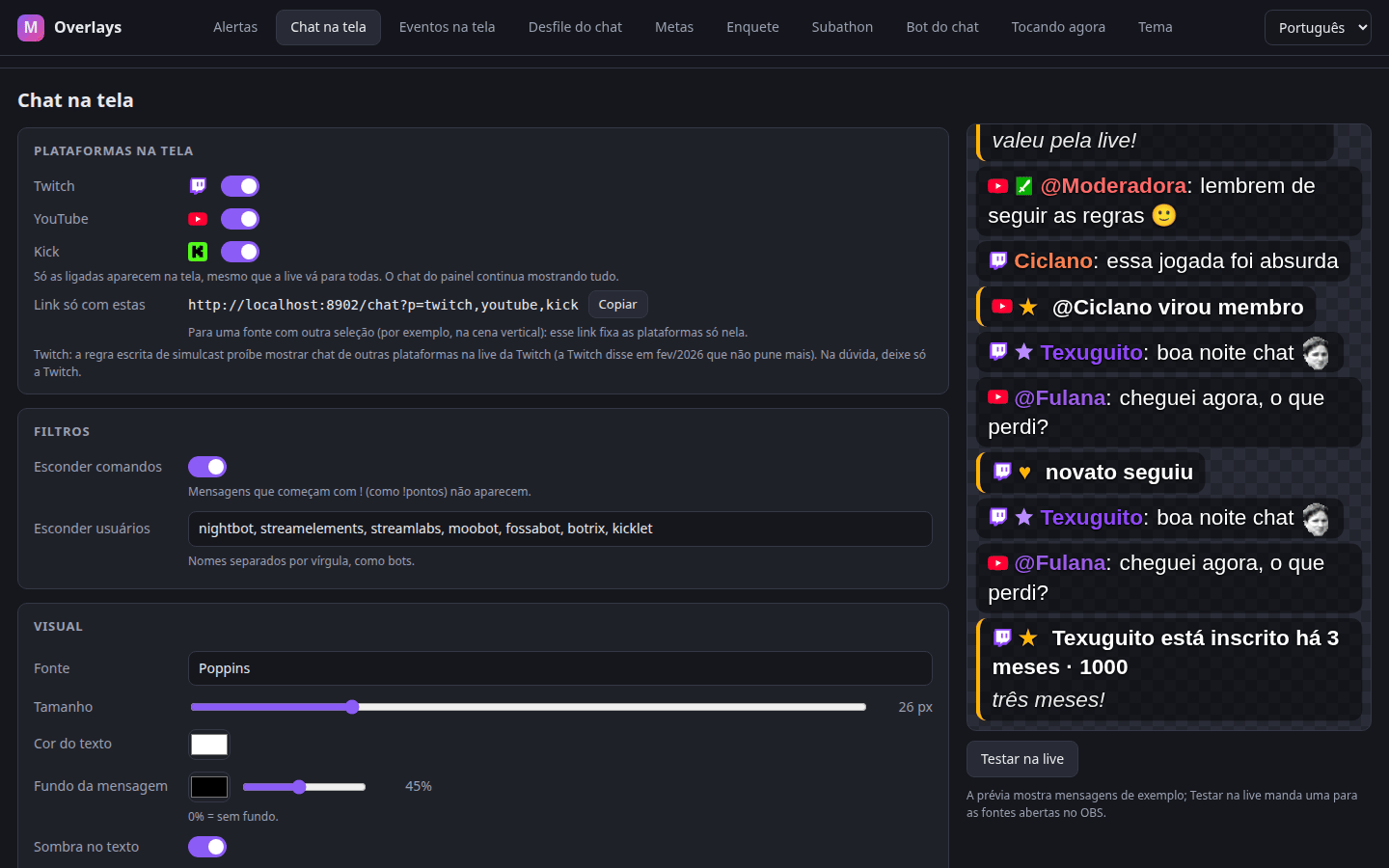
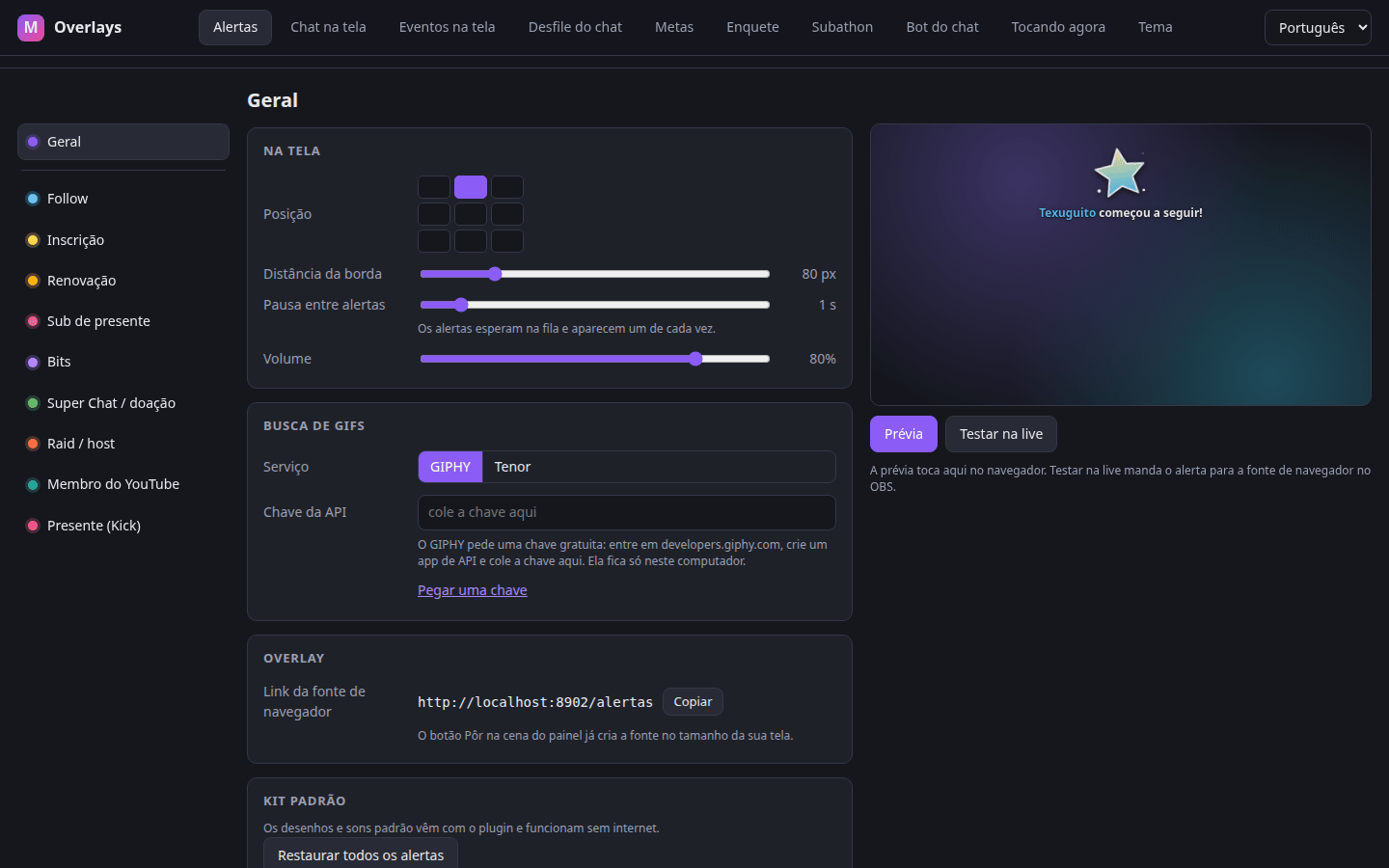
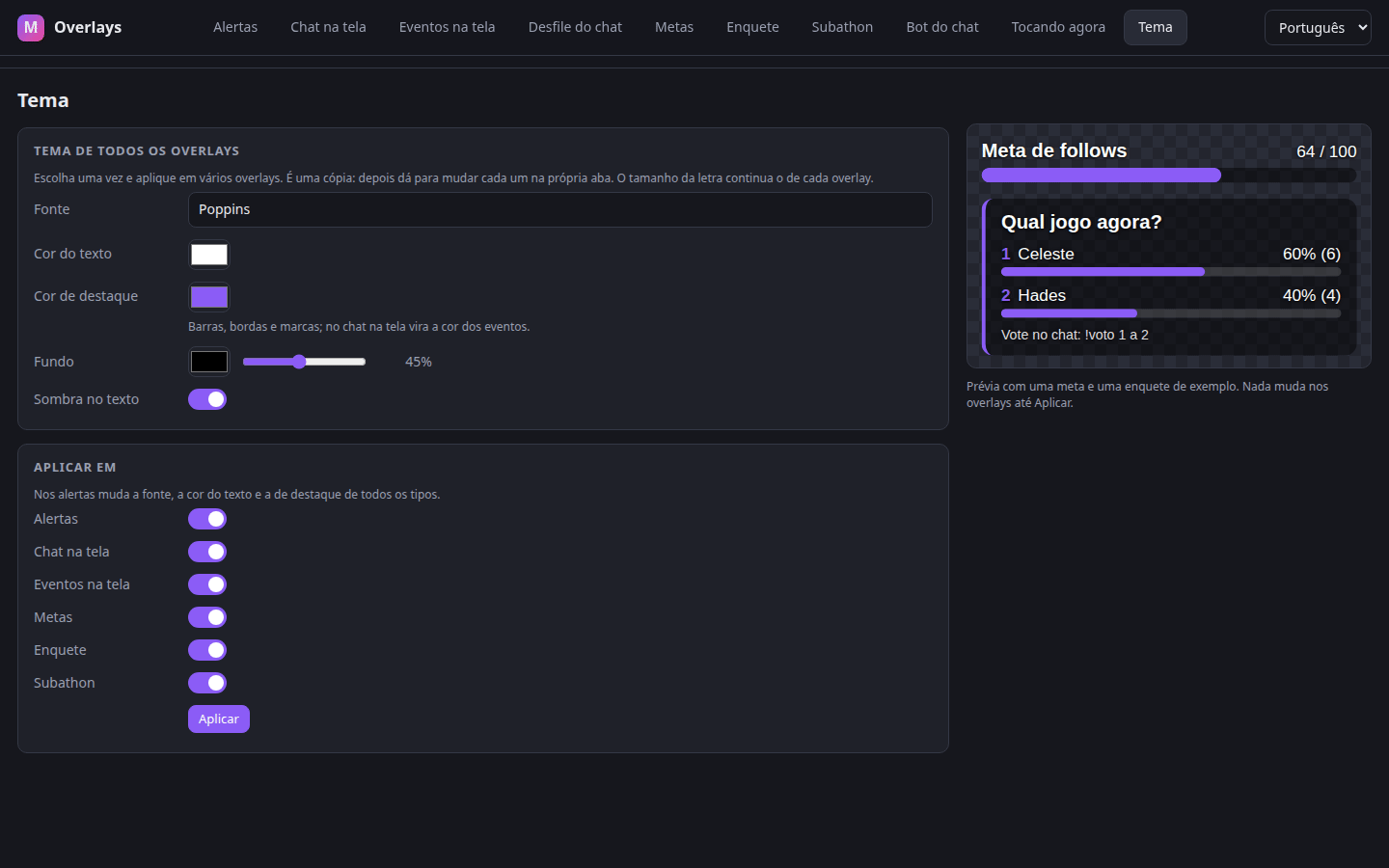
Alertas, chat na tela, eventos na tela, metas, enquete pelo chat (!voto), subathon, o desfile do bot e Tocando agora, com os eventos das 3 plataformas. Tudo num painel web que abre no navegador, com um tema para todos de uma vez.
Alerts, chat on screen, events on screen, goals, a chat poll (!vote), a subathon timer, the bot's parade and Now Playing, fed by the events of all 3 platforms. All set up in one web panel that opens in your browser, with one theme for all of them at once.
Avatar PNGTuber
PNGTuber Avatar
Um avatar que fala com a sua voz, sem programa à parte: boca fechada e aberta, pisca sozinho e dá um pulinho ao começar a falar. Aceita PNG e GIF.
An avatar that talks with your voice, no extra app: mouth closed and open, blinks by itself and hops when it starts talking. PNG or GIF.
Máscara no rosto
Face Mask
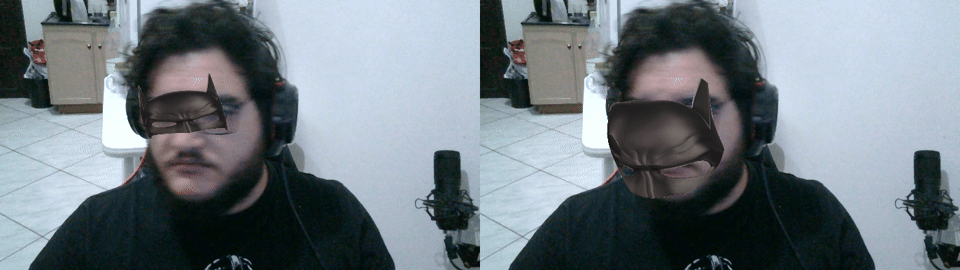
Filtro que acha o rosto e põe uma imagem ou vídeo em cima: plana, virando com a cabeça, ou deformada na malha do rosto. Tudo no seu PC; os componentes (~25 MB) baixam no primeiro uso.
A filter that finds the face and puts an image or video over it: flat and turning with the head, or bent onto the face mesh. All on your PC; its components (~25 MB) download on first use.
Voice FX
Modificador de voz: pitch, rádio, distorção, robô, bitcrusher, tremolo e eco.
Voice changer: pitch, radio, distortion, robot, bitcrusher, tremolo and echo.
Bass Shake
Faz uma fonte tremer com o grave de um áudio escolhido.
Shakes a source with the bass of a chosen audio input.
Como fica
How it looks
Painel web
Web panel
O botão Abrir painel web do painel Overlays abre no navegador uma aba para cada overlay, com prévia ao vivo.
The Open web panel button in the Overlays dock opens one browser tab per overlay, with a live preview.
Instalação
Install
Precisa do OBS Studio 31.1 ou mais novo (abas e canvas vertical: OBS 32+).
Needs OBS Studio 31.1 or newer (tabs and vertical canvas: OBS 32+).
Windows
Baixe o instalador .exe na página de releases e execute. Não precisa de administrador. Reinicie o OBS.
Get the .exe installer from the releases page and run it. No admin needed. Restart OBS.
Linux (Ubuntu, Mint, Debian)
Baixe o .deb e instale:
Get the .deb and install it:
sudo apt install ./meketreve-obs-essentials-*-x86_64-linux-gnu.deb
Ou compile do código-fonte com ./build-aux/install-linux.sh (tem opção --flatpak).
Or build from source with ./build-aux/install-linux.sh (has a --flatpak option).
macOS
Baixe o .pkg e abra. Reinicie o OBS.
Get the .pkg and open it. Restart OBS.
Predefinições
Presets
Copie um texto e cole em Ferramentas → Meketreve: Importar configuração. Elas também aparecem na própria janela de importação.
Copy a text and paste it into Tools → Meketreve: Import configuration. They are also listed in the import window itself.
Só chatChat only
Adiciona uma aba só com a prévia e o Chat Unificado, boa para uma segunda tela pequena.
Adds a tab with just the preview and the Unified Chat, handy on a small second screen.
MOE1:AAABuHjabVA7bsMwDL0KwVkK0DVb2xs0yFR0oCUmVmNJjiQ7CAwfqHOPkIuVtorCQzfx8f2oCS1nk1xfXAy4n5CDPh5wj8_WZiAo1MDNlRY-h1ygtAx94tHxDSjYdT4Gd3Js4bWloqAV-A4xiDR76jrIbKIwJYM57FBhX_TL2xrgjGQSDJ6AGuE_vsFEL8o-Pb5GR8AQV9uaYchGBU2UPaUqy3wegpWW3AnK14ED7XBWeIrJU8H9k8JAnreHrYYxdPdNl8MSLfgilYvzwt9YVOh9QhvNpb4oMYmwxF5sFlgGzxcu8jusPbmgDYWRslj-sZM7t-U__lD_UNcOHwqdlf0y6d-m9Yq1vBDm-QdF3JTR
Live simplesSimple live
Volta as abas Ao vivo e Montagem para o layout padrão.
Brings the Live and Build tabs back to their default layouts.
MOE1:AAABFnjaTY8xbsMwDEWvQnB2AnT1Vs_pkqBdig50xCREZdGQaAOFodPkKLlYJDeDFwKfH__zcUHH6RxlNNGA7YIcdp8nbLGLEq4J7MZwkJmBgoNuEu_AqE_Q0_kXTKsvERxfaPIGnv50srTHBkfbdcfS86XeCCgB9WW8K8wyKzB8aDC68gAjRQJ9RYty8XHXPeYGLxoHMmzfGgw08JbuJMPoGXwh29xaQdNqpVpQSWtqU_S_-l5QXAms-dy8VF_fw_yT8xOC3l05
MultistreamMultistream
Aba Ao vivo com a doca Saídas ao lado do chat, mais saídas extras para Twitch, YouTube e Kick. Digite cada chave de transmissão na doca Saídas.
Live tab with the Outputs dock next to the chat, plus extra outputs for Twitch, YouTube and Kick. Type each stream key in the Outputs dock.
MOE1:AAAD2njajVLBatwwEP2VQWdbyyaBgG8pubUlkGwPpfQwlmfXwrZkpLGbJezX9NyvyI91ZHvB27ShN-npad6bN_OiKoom2J6td6p4UeTyL0-qUJ_sSMBYwg_LNXBN8DBwP3CEypsGHD0zsJ8eTI2cQd8OEQQNCH5h7n2Anfw3dQZf_bAbSgJ0FXy0ptGwO_YEhKaGyIGwg4aOYN0bLa0y1XP-4VFc3ZUIdx5GO3owvgNMDIQnfP1VYQT00GLlBVxMdWgjxOV1MhehR7H4py1aTN3bg2VpCStMJSSDSmII6GJnY3z96cFdamp1ypQ02iGrYpsphx2tc_w8tGznBld9rFH5vwSmim_pI5YtVargMNC5npr9pgotcpITjM9YpDBSECRw1xebTSuz0_Or5nGDfS8i_6q8JHBZ-iiOZvCidpTiqKeTXihaxlDc3FxPolfv6KR8L0WaGXmjsMfbq-u92Zbb260-tL7ENjfecbDlwKSTUD7airx2xJP21OH3TMm-xhT-ah4zJLmmVZpPKLGn-Hwv6gmWS0cNyTiksqyMyw26EePUzcIO9lDz3_iDs3tLVZ4W7r8-nIe94pae2Xcrsn2mcJ_O75CmSHwbZ550byVyldKR2-n0G1BhUps